Posts

Showing posts with the label Technical

RND : Screen Mirror , miracast or chromecast
Image
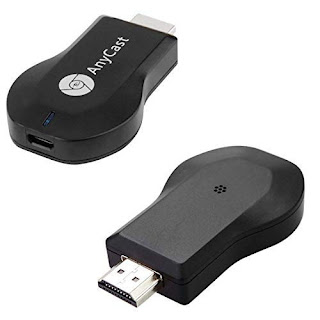
Miracast  Miracast works completely offline Part of the Wi-Fi features on new (gadgets/SmartTV)/dongle Uses Wi-Fi Direct(two devices connect to each other wirelessly, without a Wi-Fi router) Chances are, if you bought a gadget after 2014, it will support Miracast. This includes most TVs, who disguise their Miracast feature under names like "SmartShare", "AllShare", and so on Which Android devices support Miracast? Android supported Miracast in Android 4.2 (KitKat) and Android 5 (Lollipop). However, Google dropped native Miracast support in Android 6 (Marshmallow) and later.  Workaround solution (not tested) Use 3rd party app ay playstore but contain ads at setup( not sure ads will popup while using or not) Google home application Tech https://youtu.be/DhQ3VLesDHM   (miracast dongle for iphone old tv) https://www.youtube.com/watch?v=TCJEGy8ylrk  (miracast dongle for android old tv)         Workaround (miracast dongle for not support andr...
Technetium 101(React Native): Twitter Social Login

Image
  Version react-native: 0.63.4 react-native-login-twitter: ^3.0.4 Step 1 :  Go to Twitter Apps to create your app so that you can obtain API key and secret. Go to  https://apps.twitter.com Choose 3 different categories according to your profile. Refer image below. Only if selected as professional, you will be needed tp fill in your team profile. Refer image below. Then you need to write how you plan to use Twitter data/Twitter API. Minimum of 200 characters. After that read the developer agreement & policy and submit application.  It may take up to 72 hours to verify your developer's account. After your developer account been verified, you can now create new app By default, Twitter won't allow you to grab user's email, so you have to apply for a permission for your app to retrieve user's email Go to your projects & Apps and select your app Then click  Authentication settings Need to enable 3-logged OAuth and request email address Remember to set a C...

Technetium 101(React Native): Google Social Login

Image
Version react-native: 0.63.4 react-native-community/google-signin: 4.0.0 Step 1 : Install package yarn add @react-native-community/google-signin Step 2 : Create firebase project Search for Firebase and go to Firebase Console Create a project by clicking on Add Project. After done create project, click the android icon in the firebase Console Dashboard Fill in the following fields of "Add Firebase to your Android app" to generate config file ( i.e. google-services.json) Android package name (check at android manifest or android/app/build.gradle) Debug signing certificate SHA-1 open cmd go to project directory and paste keytool -list -v -keystore android/app/debug.keystore -alias androiddebugkey -storepass android -keypass android Release signing certificate SHA-1 open cmd go to jdk\bin directory and paste. eg `C:\Program Files\Java\jdk1.8.0_121\bin` keytool -list -v -keystore {path_to_your_.jks_file} -alias {alias_name} When you are done registering your android app with fireb...

Technetium 101(React Native): Facebook social login

Image
Version react-native: 0.63.4 react-native-fbsdk: ^3.0.0 Step 1 : Create App On Facebook Developers And Add Basic App Info Login with your facebook account and go to https://developers.facebook.com/apps/ and create new app After success, notice the App ID at top, this will be use later in application. Go to settings -> basic located at left drawer Fill in Contact Email, Privacy Policy Url, Category, App Icon, Business use and save Go to bottom of Basic Settings and add platform Android/Ios Ios … Android Check applicationId from android/app/build.gradle Copy applicationId from application and paste in Google Play Package Name. eg. “com.appdevtrend2021 Fill in Class Name with applicationId with added .MainActivity. eg”com. appdevtrend2021.MainActivity” If popup comes for package name verification select “Use this package name” Key Hashes need to fill in if only for release, if debug not needed ( https://aboutreact.com/getting-key-hash-for-facebook-console/ ) You will need to provi...